How to know who has saved your number in Telegram?
Telegram is an increasingly popular messaging service, similar to services like
WhatsApp and Messenger.
Users need to provide a valid phone number to sign
up for Telegram, and other users can abuse this fact and access your phone number
through this application.
If you want to know how to see who has saved your
phone number on Telegram, then you've come to the right place. Read on and you'll
find exactly that, as well as some other useful information and security tips.
Telegram provides your phone number to everyone in your contact list by
default. You can check this in the following ways.
1. Start Telegram on your
device (computer, tablet, smartphone, whatever).
2. Tap the hamburger icon
on the screen, go to Settings, and select Privacy and Security.
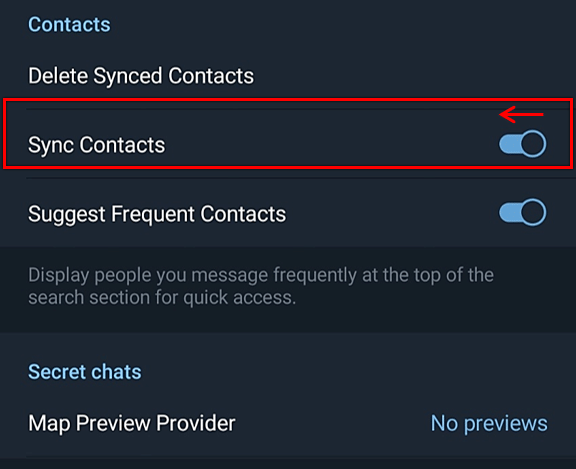
3. Check
Sync contacts. If the slider is not grayed out (disabled), everyone in your contacts
will be able to view your number using Telegram. We strongly recommend disabling
this option. Move the slider next to Sync contacts and make sure it is turned off.
However, you can use it to see who has saved your number.
If you see your
friend's phone number on Telegram, you can assume they also have your phone number.
If you can only see their username, it means they don't have your phone number
saved.
Obviously, it's not a good idea to share your phone number with
strangers. There are a few other security precautions you should take when using
Telegram. One of the most important things to do is to use a VPN service.
With
a VPN, you can hide your IP address from prying eyes. If you want to have a private
conversation on Telegram, you can do so.
In conclusion, you should be
careful when sharing your personal information online. If you use Telegram, it is
best to disable contact syncing. Sharing your phone number with a close friend is
one thing, but sharing it with a complete stranger can be dangerous.