How to hide the list of followers in Instagram?
Hiding your followers list is an important step in maintaining your social media
privacy. Here we will explain how to hide your followers list on Instagram to give
you better control over your privacy.
1. Using your iPhone or Android
device, open the Instagram app and sign in to your account.
2. Click on the
profile icon located in the bottom right corner of the screen.
3. Tap the
hamburger icon in the upper right corner of your profile.
4. Select
"Settings" from the menu that appears.
5. Scroll down and select "Privacy".
6. Toggle the switch next to "Private Account" on the right. This will make
your Instagram account private.
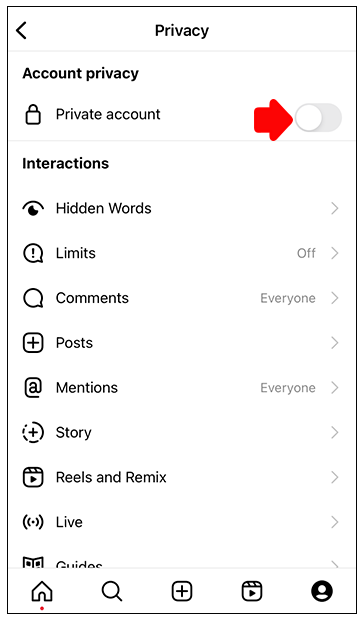
7. When prompted, click "Switch to Private" to confirm the action.

After setting your account to private, only users who follow you will be able to see
your posts and follow list. To approve or deny a follow request, go to the
"Requests" tab in the "Followers" section of your profile settings.
Fortunately,
making your Instagram account private is a simple process that can be completed in
just a few steps. Now you can protect your privacy on the platform and control who
can see your posts and follow list.
Manage Instagram follow
lists
Instagram allows you to follow other users so you can see
their content in a dynamic way. However, managing your follow list can sometimes be
a challenge, especially as you accumulate more followers. Here are some tips for
managing your Instagram follow list:
1. Be sure to check your followers list
regularly to make sure you are only following users you are still interested in.
Some users may have changed the type of content they share, or you may simply no
longer find their content appealing. Unfollowing these accounts can help you focus
your feed on the content you like.
2. Use the "mute" feature, which allows
you to temporarily hide posts from certain accounts without unfollowing them. This
is a good option if you want to continue following someone but don't want to see
their posts in your feed for a while.