How to fix the Instagram Challenge_Required Error?
If you use Instagram on a daily basis, you've probably encountered an Instagram error
or bug at least once. While there are hundreds of Instagram error messages for
different types of malfunctions, most users encounter only a fraction of them.
How to fix the Instagram Challenge_Required Error?
There
are several different versions of the challenge_required message, but the most
common version is InstagramAPI/Response/LoginResponse: Challenge required.
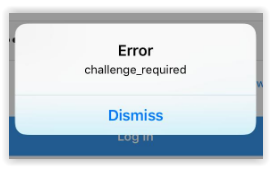
If you see this error message or any other version containing Challenge_Required, it
indicates a problem in establishing the proper security protocols required for
Instagram to function properly.
Challenge_Required is a method created by
Instagram developers to check if a user is human and to prevent bots from using the
platform.
However, there is another purpose behind the Challenge_Required
method. Its other goal is to ensure that you are the owner of the account.
When
prompted with a Challenge_Required error message, Instagram will ask you to prove
that the account belongs to you. The error message is usually displayed when you try
to log in to your Instagram account from a web server.
Fortunately, this
problem can be fixed.
All you need to do is sign in to your account from
your mobile device using the Instagram app or the official Instagram website. Using
a known device will improve your chances of success.
After logging in again,
it's a good idea to enable two-factor authentication in the app settings.
If
you still receive the same error message, it means that Instagram does not want to
allow your server's IP to connect. In this case, you will need to use a proxy
server.
Or one of your comments may have been flagged as offensive or
against Instagram's policies, which may also result in a challenege_required error.
Troubleshooting Instagram errors
One of the best
ways to begin troubleshooting is to consider any changes you made to your phone or
account when the problem began. This sounds simple, but many things can interfere
with your Instagram's functionality.
Some Instagram errors are caused by the
following:
- Has your phone been recently updated?
- Have you
downloaded any third-party apps that require access to your Instagram account, such
as the Collage app?
- Have you used Instagram on another device?
-
Are you using a new malware or anti-spyware program?